This article belongs to a series of articles about MLOps tools and practices for data and model experiment tracking. In the first part, we explained why data and model experiment tracking was important, and how tools like DVC and Mlflow could solve this challenge. Today, we’ll see how Data Version Control (DVC) smartly manages your data sets for training your machine learning models on top of Git.
By Samson ZHANG, Data Scientist at LittleBigCode
What are we talking about? DVC is a MLOps tool that works on top of Git repositories and has a similar command line interface and workflow to Git. It is designed to tackle the challenge of data sets traceability and reproducibility when training data-driven models.
Why do we need DVC ?
All data-driven models require data to be trained. Managing and creating the data sets used for training data-driven models requires a lot of time and space. Depending on the project, there can be up to thousands of versions of the data set to train the models. This can quickly become muddled due to multiple users altering and updating the data which can greatly jeopardize the traceability and reproducilibity of experiments.
In your data scientist career, you probably experienced data versions tracking issues when exploring and cleaning your data set, just like me.
For instance, I often worked on computer vision problems with thousands of images/annotation files. Counting the raw noisy data, the cleaned data and the preprocessed data, there are already 3 different versions to keep. And that is still without keeping track of some processing steps results!
Without DVC, a possible approach would be zipping files and storing hashes (file content checksum), and locations in Git commits. The data set would be fully duplicated for each version. It would be complicated to update and to keep track of. Just imagine the work you would have to do each and every time you have new data to add or wrong labels to correct!
This iterative process on the data set can be applied to many data science projects and it is not scalable without proper tools.
DVC has been created to exactly handle this iterative process in an efficient way.
Why use DVC for data version management instead of other tools such as Git or Mlflow ?
Mlflow is not designed to track a lot of large files (for instance, thousands of images) as it does not optimize storage for file duplication. Tracking datasets version with Mlflow would be inefficient. Mlflow itself does not guarantee the reproducibility of a data set used during an experiment run, unless you save the whole data set during each run, which is not scalable.
Git is unsuited for large files versioning in general (especially for datasets). Furthermore, saving your data set with your source code can be a huge security breach as anybody that works on the code can access potentially sensitive data (even worse for public git repo).
Those are the main reasons that motivate the use of an additional type of tool for data versioning such as DVC for improving your MLexperiments tracking experience. DVC complements Mlflow and Git in order to provide a complete ML tracking experience.
Technically, DVC is a file-versioning tool that can work with any type of data (image, text, video) as it saves files. But the latter does not mean that it is adapted to version complex data types for ML purposes such as large video files because DVC simply tracks file versions with hashes (content checksum). For instance, a few seconds modification to an 1h-long video file (several GBs) results in 2 full 1h-long video files stored which implies a lot of duplication.
How does it work ?
You can version datasets in your Git repository by only storing small *.dvc metafiles (text) tracked by Git commits (cf. figure 1). It has an optimized versioning capability like git by only storing the minimal quantity of information to describe the data across all the data set versions in a repository. The same file appearing in multiple data set versions is stored only once.
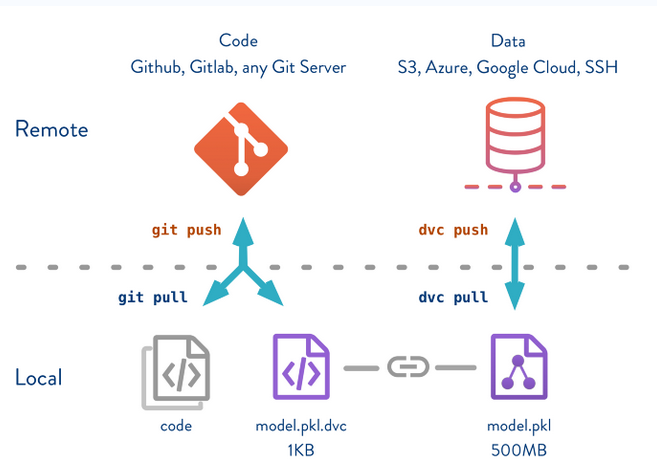
Figure 1. How DVC works. Source: DVC.org
Project structure
A DVC repository is a Git repository that tracks DVC files. Setting up a DVC repository and do data versioning is easy.
Let’s take a look at the composition of a DVC repository :
For a Git repository to be also be a DVC repository, there are only 2 elements needed:
►.dvc/ subdirectory at the project’s root. This directory mainly contains customizable config files. By default, it also contains the DVC repository cache;
►*.dvc files
DVC files (*.dvc) are the entry points for versioning data. They are metafiles used by DVC to point to the data in a storage space. DVC files and an URI of the data storage space (local file system, AWS, Azure, GCP…) are the only information needed for versioning data sets. You can think that *.dvc files are like indexes, they are light and easily versionable addresses that point tothe actual data stored in a more suited storage space (cloud, local remote storage).
It means that *.dvc files have to be tracked by Git, in order to track different versions of a data set. Conversely, if a data set version pointed by a .dvc file is not tracked by Git, it can become inaccessible (it is not designed to be accessed without .dvc files) but the data will still exist in the storage.
Basic commands
Like Git, DVC is configurable (remote storage, scope) and has “add”, “push”, “pull”, “checkout” commands for managing your data files. DVC is compatible with all the main cloud providers: Google Cloud, Microsoft Azure and AWS S3, and it does not have any infrastructure requirements.
How DVC manages data set versions and avoids duplication
The local DVC cache (DVC Cache structure) contains all the versioned data sets without file duplicates between versions. This cache can be anywhere on the local system. A working copy of this cache is duplicated with an user-specified file link (copy, reflink, hardlink, symlink) dvc link types into the Git repository workspace for the files to be accessed by the project.
By default, the copy strategy is used. For more details about the file link type, check out the dedicated section “Configure your DVC cache” of this article.
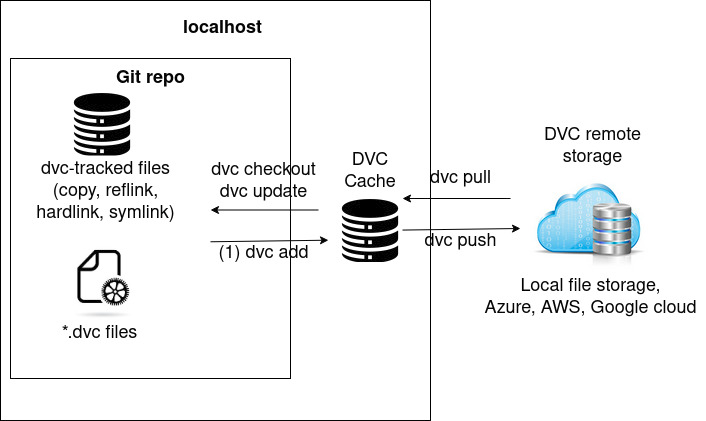
Figure 2. DVC workflow, cache and storage
In order to explain how DVC cache optimizes storage space by avoiding files duplication between different versions of a data set, let us look at an example:
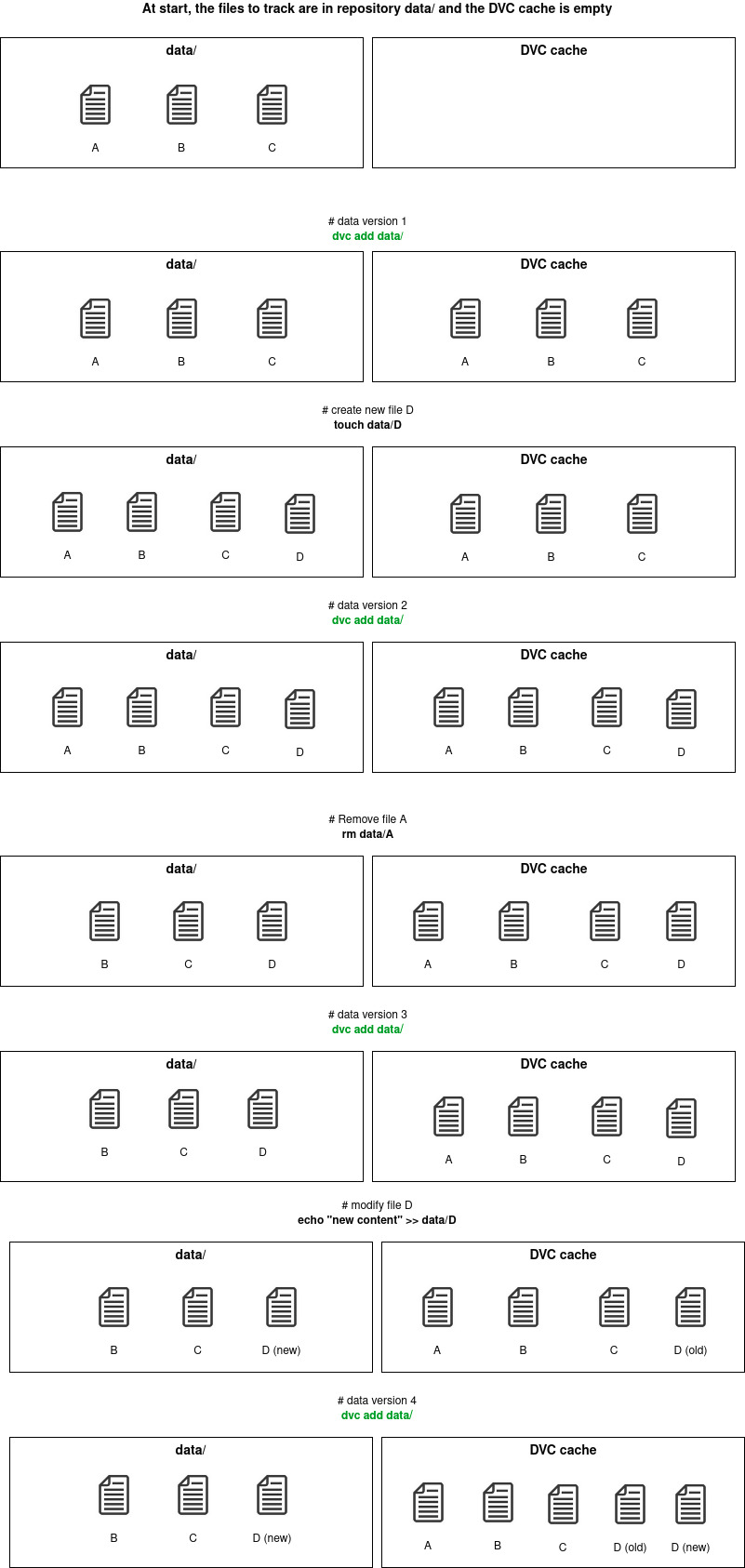
Figure 3. DVC cache workflow
Each “dvc add” command uploads a new version of the data set (cf. figure 3). Each file is saved only once (for any version) and the no-duplication is ensured by file checksum comparison between versions. An internal database maps each file to each data version it belongs to.
Even though DVC is built on top of Git, DVC does not have a history system like Git. There are no explicit branching logic and commit dependencies handled by DVC itself. DVC only reasons on file presence and content, by checking hashes, to determine data versions. The dependency logic between data versions is handled by Git history. It means that you can create different data set versions on different Git branches and DVC maps each file, ever tracked in the repository, to every commit/branches that tracks it.
DVC best practices
After some experimentation with DVC, there are few good practices I think one should pick up when using DVC:
• Use DVC only for data-related tasks such as data set versioning, data processing routines. Not for logging experiment metrics and model weights. Even though the DVC documentation indicates that those features exist with its versioning capability, DVC is not designed to do experiment runs performance comparison, unlike MLflow, without many tricks and saving unnecessary files to the code base.
• Use Data Registry whenever possible in order to centralize data sets that can be shared in different projects. A DVC data registry is basically a Git repository that only contains DVC files (no code) that can version as many data sets as your organization have. An example of data registry setup is developped in the next section of this article.
• Unless you explicitly want to share your project’s DVC configuration such as a remote storage URL for a data registry, never use global configuration (.dvc/config). Prefer your project’s private configuration .dvc/config.local instead by using the –local argument to your configuration-modifying commands. Most of the time, your configuration depends on your local workspace (cache location/type) and you might need to use secrets for cloud remote storage (azure credentials,…). There is no reason to use .dvc/config for it.
• Write descriptive Git commits when versioning data sets, otherwise it can become hard to track meaningful changes in the data sets. This applies to software engineering in general. • Configure DVC repository cache. Do not use default when possible. Use an external cache if you have limited storage resource in your Git repository workspace. If you do not need to edit your DVC-tracked files in place, change your cache type link to save space from copy (default) to reflink,hardlink,symlink Large Dataset Optimization. Most of the time, the best cache configurations are: {reflink,hardlink,symlink}+external cache dir on large disks for SSD(small)+HDD/SSD(large) hardware configuration. • Use DVC, Git hooks for common routine automation (post-checkout, pre-commit, pre-push). In a DVC repository, use “dvc install” command to set up hooks.
Go further in setting up your DVC projects !
Set up a data set registry
DVC is simple to use as it is a thin layer over git repositories. One can directly use an existing Git repository in order to build a DVC repository on top of it and do data versioning for the given git project. The given Git repo would be the main entry point for accessing data set versions. It can be enough for doing experimentation by yourself on a single project, but it would easily become inefficient when you want to share the data sets with other projects. In practice, datasets are often re-used in multiple projects. This is why you should set up a data registry (cf. figure 4) whenever possible.
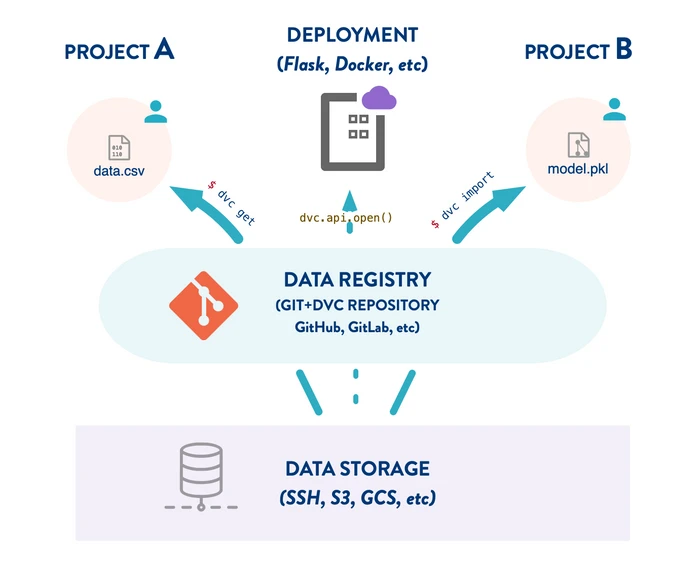
Figure 4. Data registry in DVC. Source : Data Version Control · DVC
1 • Let’s start from scratch. First create a new Git repository and initialize the dvc repository init on top of it. I recommend you creating a new conda environment for it. (Highly recommended) Configure git hooks for DVC install 2 • dvc remote add Set up the remote storage for your DVC repository, it can either be a local file storage or a remote storage and commit it. (optional) install dvc dependencies for cloud remote storage if necessary (example for azure):
For local file storage : This modifies the content of .dvc/config in your repository, that represents your project’s global configuration. You can check config for more configuration options.
For Azure storage, assuming you have enough credentials, the following commands modify your .dvc/config file for the remote URL and modifies the .dvc/config.local that stores credential only locally. You can find other examples for settings up your Azure storage here remote modify but it is recommended to use a SAS token.
3 • Commit your remote storage config
4 • Download your first data set version to track with DVC. Note that we are downloading data from a public DVC data registry using dvc cli but you can retrieve data however you want:
5 • Track your data set with DVC and git commit *.dvc files to version your data set:
Check the content of the cats_vs_dogs.dvc. It contains meta data useful to DVC in order to track your data set in the remote : 6 • Push your data set to the remote storage. At this point, you can already use this DVC repository in other projects. If you set up a cloud remote storage and push your Git repository to Github/Gitlab, you can even share your data registry with anybody: 7• Modify your data set by adding new images and create a data set version (like steps 3, 4 and 5): if you check the status of your DVC repository with « dvc status », you will be informed of changes: So add and commit the changes : 8 • Your data set registry is set up. Import/use data from a DVC data registry with get and import commands.
Configure your cache
The DVC cache is a content-addressable storage (by default in .dvc/cache), which adds a layer of indirection between code and data. (cf. DVC Cache structure). It is the DVC cache that stores the data sets in the local working environment.
Cache type
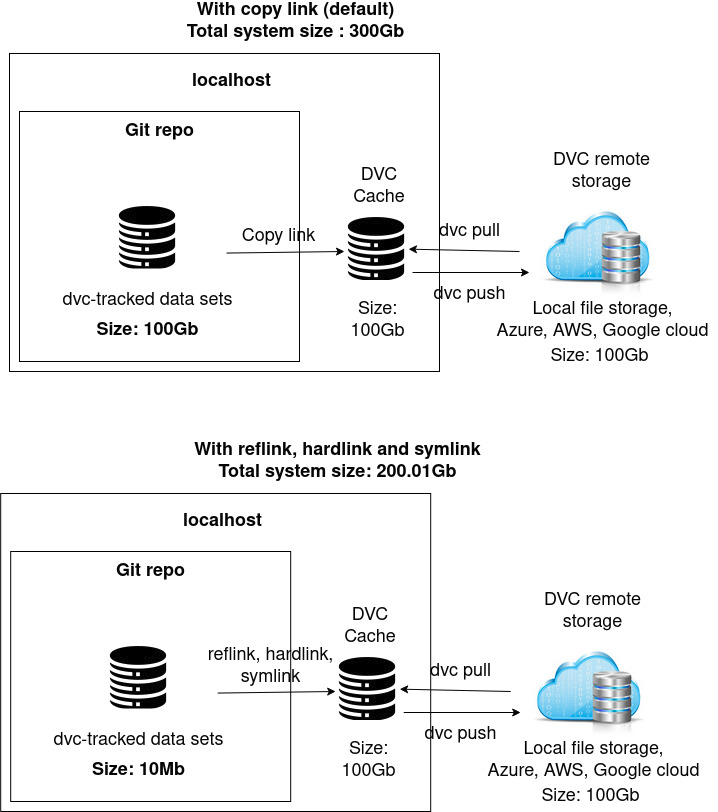
Figure 5. The impact of using different file link types on local storage space used with a 100Gb data set
Reflink, hardlink and symlink file linking types are particularly useful when you do not want to have the DVC project cache in the same subdirectory as your source code or if you are lacking space in your workspace partition (cf. figure 5 and Large Dataset Optimization). These file link types allow to save space. Usually, you will not work in an environment that provides reflink. These link types avoid having your DVC-tracked data set duplicated both in your cache and in your local git repository.
Most of time, for large data sets (>1Gb), you would want to use reflink, hardlink and symlink, although in-place edition is not available for hardlink and symlink. Depending on the task you are doing on the data set, you might want to edit the data in place, for instance manual data preprocessing or label fix. In this case, an editable link type should be preferred such as reflink or copy over hardlink and symlink.
You can always switch between different cache types depending on the stage of your machine learning project.
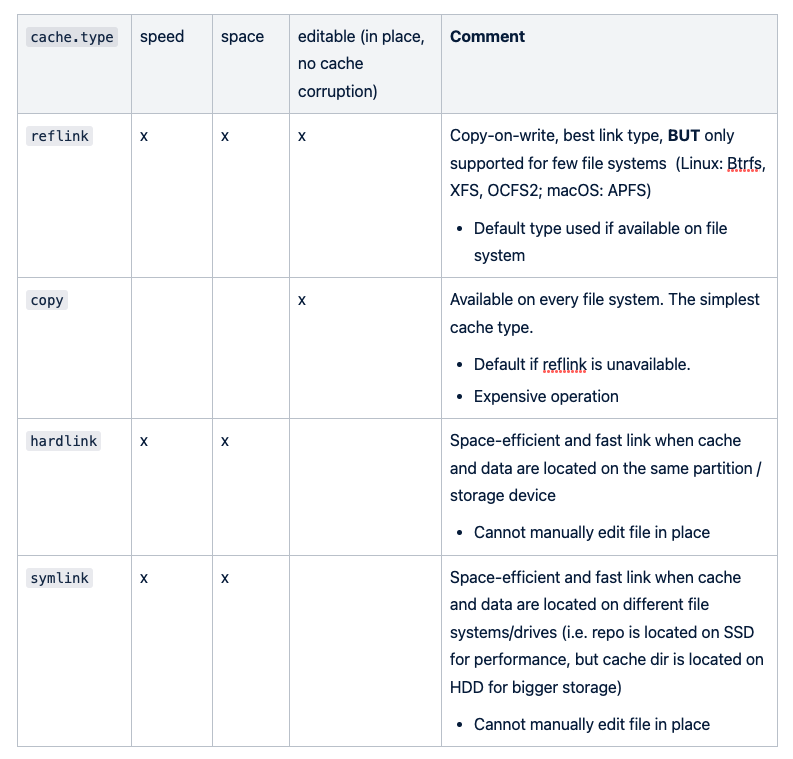
A summary of DVC features, pros & cons:
Por ejemplo, si necesitas editar manualmente tus datos in situ, vuelve a un tipo de enlace editable. Checkout
Cuando ya no necesites editar tu conjunto de datos manualmente o desees pasar a otras etapas de tu proyecto (formación, evaluación), simplemente cambia a uno de los enlaces más ligeros para ahorrar espacio:
Ubicación de la caché
La mayoría de las veces, ejecutamos proyectos de aprendizaje automático en nuestra computadora portátil o de escritorio con varios discos físicos y recursos limitados. Por lo general, SSD para un acceso rápido a la E/S donde está el código y un disco duro con gran espacio de almacenamiento para sus conjuntos de datos.
De forma predeterminada, la caché estará en la raíz de tu repositorio de git.
Si ha configurado un tipo de caché de copias para su proyecto, la caché puede ocupar un gran espacio del disco. Es posible que tengas que cambiar el tipo de caché por uno más ligero: enlace directo, enlace fijo o enlace simbólico.
O simplemente puede mover la memoria caché a otra partición que tenga más recursos:
Acerca de los conflictos de combinación de conjuntos de datos con DVC DVC rastrea las versiones de los conjuntos de datos aprovechando la funcionalidad de control de versiones de Git. Cuando se trata de conflictos de fusión, DVC no tiene una función integrada de resolución de conflictos, por lo que DVC también utiliza git para la resolución de conflictos. Como sabemos, solo rastreamos los archivos*.dvc con Git, lo que significa que cuando hay conflictos de fusión, solo se comparan los metaarchivos, lo que a menudo es insuficiente, ya que no se comparan las versiones de los conjuntos de datos. Un ejemplo de conflicto de archivos*.dvc al fusionarlos:
Las 3 situaciones a las que nos enfrentaremos comúnmente Para ilustrarlo, digamos que dos personas, P1 y P2, están trabajando juntas en un proyecto de aprendizaje automático con un conjunto de datos de imágenes. P1 trabaja en la rama B1 y P2 trabaja en la rama B2. El conjunto de datos inicial data/ (rastreado por data.dvc) en el que están trabajando es la versión D1:
• Primera situación: solo uno de los P1 y P2 cambia el conjunto de datos. P1 cambia el conjunto de datos y crea una versión D2 del conjunto de datos en la rama B1. P2 termina de trabajar en una nueva función y no modificó el conjunto de datos D1. P2 necesita fusionar B1 con B2 y resolver el conflicto sobre la diferencia entre las versiones del conjunto de datos. Como solo una de las ramas modificó el conjunto de datos D1 original, P2 simplemente puede reemplazar su versión de data.dvc (en la rama B2) por la versión de la rama B1.
• Segunda situación: tanto P1 como P2 solo agregan imágenes que no se superponen al conjunto de datos. P1 solo agrega imágenes nuevas al conjunto de datos D1 y crea D2 en B1. P2 también solo agrega imágenes nuevas al conjunto de datos D1 y crea D3 en B2. Además, los subconjuntos de imágenes que ambos agregaron son disjuntos. En este caso, la fusión puede usar Git drive merge DVC: Merge conflicts, conjunto de datos solo para anexar
• Tercera situación: tanto P1 como P2 cambian el conjunto de datos (eliminación, adición, modificación). P1 cambia el conjunto de datos y crea una versión D2 del conjunto de datos en la rama B1. P2 también cambió el conjunto de datos D1 y creó una versión D3 en la rama B2. P2 necesita fusionar B1 con B2 y resolver el conflicto sobre la diferencia entre las versiones de los conjuntos de datos entre D2 y D3. Aquí no se hace ninguna suposición sobre el tipo de modificaciones en el conjunto de datos; puede haber eliminaciones, adiciones y modificaciones en cualquier archivo del conjunto de datos. Si realmente desea combinar todas las modificaciones de ambas ramas, esta es la situación más complicada. Ni git ni DVC pueden ayudar directamente. Tienes que combinar manualmente los conjuntos de datos.
Acerca del seguimiento de hiperparámetros con DVC
DVC también puede rastrear archivos métricos e hiperparámetros, pero MLFlow es más adecuado para hacerlo. Por ejemplo, DVC puede realizar un seguimiento de los resultados de los experimentos asignando archivos de métricas (a DVC y a un repositorio de git) y comparando diferentes versiones (diferentes confirmaciones) de un archivo de métricas utilizando Estudio DVC. Por lo general, es posible que desee reducir la cantidad de herramientas utilizadas en la medida de lo posible y no querer duplicar los resultados con múltiples herramientas, como el repositorio Git (DVC) y en un servidor remoto (Mlflow).
Además, DVC y Mlflow tienen diferentes enfoques con respecto al control de versiones de métricas:
- El DVC hace un seguimiento de las métricas de los experimentos con una confirmación tras la formación del modelo o la generación de resultados;
- MLFlow rastrea los resultados de los experimentos utilizando la confirmación actual utilizada para entrenar los modelos.
El enfoque de DVC es más ligero que el de Mlflow para el seguimiento de las métricas, ya que DVC guarda los archivos de métricas directamente en el repositorio de Git, a diferencia de Mlflow, que guarda las métricas en un servidor remoto. Dicho esto, ambos enfoques son contradictorios cuando se utilizan al mismo tiempo para el seguimiento de las métricas. Esto significaría que Mlflow rastrearía un experimento en la confirmación N y DVC rastrearía los resultados en la confirmación N+1, lo que no es práctico. Mlflow tiene la ventaja de tener una función de registro automático que hace que el seguimiento de las métricas sea sencillo y transparente (además de registrar los artefactos, entre otras funciones). Con el DVC, sería necesario gestionar manualmente el registro de métricas en los archivos, lo cual es un inconveniente.
En aras de la simplicidad y dado que esta serie de artículos se centra en el seguimiento de experimentos con DVC y Mlflow, recomendaría usar Mflow para el seguimiento de métricas a través de DVC. Sin embargo, hay que saber que técnicamente es posible rastrear las métricas de los experimentos con el DVC (con un poco de esfuerzo).
Conclusión
DVC es una herramienta ligera de control de versiones de archivos creada sobre las capacidades de control de versiones de Git diseñadas para el control de versiones de conjuntos de datos. Cuenta con un sistema de caché optimizado que evita la duplicación de archivos entre diferentes datos y versiones. El uso de una herramienta de terceros como DVC permite desvincular del código los conjuntos de datos sin procesar utilizados para entrenar modelos de aprendizaje automático mediante la creación de pequeños metarchivos que describen los conjuntos de datos rastreados por un repositorio de Git. El DVC también se puede usar para canalizaciones de preprocesamiento de datos. Su funcionalidad de registro de conjuntos de datos es particularmente útil para gestionar el intercambio de conjuntos de datos entre diferentes proyectos de ciencia de datos.
Un resumen de las características, ventajas y desventajas del DVC:
Este artículo pertenece a una serie de artículos sobre las herramientas y prácticas de MLOps para el seguimiento de datos y experimentos con modelos. Se publican cuatro artículos:
PARTE 1 (Haga clic aquí): Introducción al seguimiento de experimentos con datos y modelos
PARTE 2 (este artículo): MLOps: ¿Cómo gestiona DVC de forma inteligente sus conjuntos de datos para entrenar sus modelos de aprendizaje automático sobre Git?
PARTE 3 (disponible próximamente): MLOps: ¿Cómo MLFlow rastrea tus experimentos sin esfuerzo y te ayuda a compararlos?
PARTE 4 (disponible próximamente): Caso práctico: Realice un seguimiento sin esfuerzo de sus experimentos con modelos con DVC y MLFlow
¡No dudes en ir a otros artículos si ya estás familiarizado con los conceptos!